The IGNOU assignment front page is an important part of an assignment submission for students of Indira Gandhi National Open University. Students are generally required to attach a properly completed front page with their assignments before submitting them to the concerned study centre or through the prescribed online submission process.
The front page contains important details that help identify the student, programme, course, assignment and study centre. Filling these details correctly is important because incorrect or incomplete information can create difficulties while processing and evaluating the assignment.
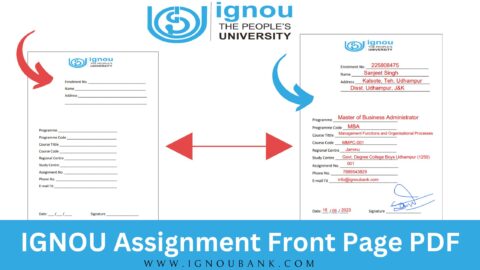
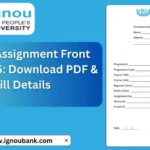
The downloadable front page contains fields such as enrolment number, name, address, programme, programme code, course title, course code, regional centre, study centre, assignment number, phone number, email ID, date and signature.
IGNOU Assignment Front Page PDF
The IGNOU assignment front page is designed to provide essential information about the student and the assignment being submitted. Before submitting an assignment, students should download the front page, print it if required, and fill in all the necessary details carefully.
A properly completed front page makes it easier to identify the assignment and associate it with the correct student and course.
You can download the IGNOU assignment front page PDF using the following link:
IGNOU Assignment Front Page Download:
https://ignoubank.com/wp-content/uploads/2023/05/IGNOU-Assignment-Front-Page-IGNOUBANK.COM_.pdf
The PDF includes separate fields for the student’s enrolment number, name, address, programme, programme code, course title, course code, regional centre, study centre, assignment number, phone number, email ID, date and signature.
Important Links and Information
| Information | Details |
|---|---|
| Assignment Front Page | IGNOU Assignment Front Page |
| Front Page PDF | https://ignoubank.com/wp-content/uploads/2023/05/IGNOU-Assignment-Front-Page-IGNOUBANK.COM_.pdf |
| Enrolment Number | Enter your IGNOU enrolment number |
| Student Name | Enter your full name |
| Address | Enter your correspondence address |
| Programme | Enter your programme name |
| Programme Code | Enter your programme code |
| Course Title | Enter the title of the course |
| Course Code | Enter the course code |
| Regional Centre | Enter your regional centre |
| Study Centre | Enter your study centre |
| Assignment Number | Enter the applicable assignment number |
| Phone Number | Enter your active phone number |
| Email ID | Enter your email address |
| Date | Enter the date of submission |
| Signature | Sign in the designated space |
What Is an IGNOU Assignment Front Page?
The IGNOU assignment front page is the first page attached to an assignment. It contains information that identifies the student and the particular assignment.
Since IGNOU offers many programmes and courses, students may submit assignments for several different subjects. Therefore, details such as the enrolment number, programme code, course code and study centre are useful for identifying the assignment correctly.
The front page available through the download link contains fields for all these important details.
Students should avoid leaving important fields blank unless a particular field genuinely does not apply to them. It is also important to make sure that the information written on the front page matches the information associated with the student’s IGNOU registration.
How to Download IGNOU Assignment Front Page?
Downloading the assignment front page is simple. You can use the following steps:
Step 1: Open the Download Link
Open the following link in your browser:
https://ignoubank.com/wp-content/uploads/2023/05/IGNOU-Assignment-Front-Page-IGNOUBANK.COM_.pdf
The PDF contains the IGNOU assignment front page.
Step 2: Download the PDF
Once the PDF opens, use the download option available in your browser or PDF viewer to save the file to your computer or mobile device.
It is recommended that you keep a copy of the downloaded PDF so that you can use it whenever you need to prepare an assignment.
Step 3: Print the Front Page
If you are submitting a handwritten assignment, you can print the front page on a suitable sheet of paper.
Make sure the printed page is clear and that all the fields are readable.
Step 4: Fill in Your Details
Enter your student and assignment information carefully. Check the enrolment number, programme code, course code and other details before attaching the front page to the assignment.
Step 5: Sign and Date the Page
The front page contains fields for the date and signature. Complete these fields before submitting the assignment.
Details Required on IGNOU Assignment Front Page
The front page contains several fields. Students should understand what information should be entered in each field.
1. Enrolment Number
Enter your IGNOU enrolment number exactly as provided in your student records or admission documents.
Double-check every digit before submitting the assignment.
2. Name
Enter your full name. It is advisable to use the name associated with your IGNOU student registration.
3. Address
The front page provides space for entering the student’s address. Write your address clearly so that the information can be read easily.
4. Programme
Enter the name of the programme in which you are enrolled.
For example, students should enter the applicable programme name rather than simply writing “IGNOU Student.”
5. Programme Code
Enter the correct programme code.
The programme code should correspond to the programme in which you are currently enrolled.
6. Course Title
Enter the title of the course for which the assignment has been prepared.
Make sure that the course title corresponds to the course code mentioned on the front page.
7. Course Code
Enter the appropriate course code.
This is particularly important because students may have multiple assignments for different courses.
8. Regional Centre
Enter the regional centre associated with your IGNOU registration.
9. Study Centre
Enter your study centre details correctly.
The study centre information can be important when the assignment is submitted through the prescribed offline process.
10. Assignment Number
Enter the assignment number applicable to the assignment you are submitting.
Check your assignment question paper or relevant assignment instructions before entering this information.
11. Phone Number
Enter an active phone number.
Make sure that the number is written clearly.
12. Email ID
Enter your active email address. The front page includes a dedicated field for the student’s email ID.
13. Date
Enter the date on which you are completing or submitting the assignment, according to the applicable submission requirements.
14. Signature
Sign in the space provided on the front page. The downloaded PDF includes a dedicated signature field.
How to Fill IGNOU Assignment Front Page Correctly?
Students should take a few precautions while filling out the front page.
First, make sure that your enrolment number is correct. A single incorrect digit can result in incorrect student identification.
Next, check your programme and programme code. If you are submitting assignments for several courses, pay particular attention to the course title and course code.
The study centre and regional centre details should also be entered carefully.
After completing the page, review all information before submitting your assignment. Check the spelling of your name, enrolment number, course code and other important information.
It is also a good idea to keep a copy or photograph of the completed front page and assignment for your personal records.
Should the IGNOU Assignment Front Page Be Attached to the Assignment?
The assignment front page is intended to provide identifying information about the assignment. Students should follow the current submission instructions applicable to their programme and assignment.
If your submission instructions require a front page, attach the completed front page as the first page of your assignment.
For online assignment submission, students should also follow the specific file-format, scanning and uploading requirements provided for their submission process.
Can You Type the Details on the Front Page?
The PDF can be downloaded and printed for completion. Depending on the submission method and instructions applicable to your assignment, students may also be able to enter information digitally before printing or submitting the document.
However, the important thing is that all required information is clearly visible and accurate.
For handwritten assignments, students should make sure that the front page information is neat and readable.
Common Mistakes While Filling IGNOU Assignment Front Page
Students should avoid the following common mistakes:
Entering the Wrong Enrolment Number
The enrolment number is one of the most important details on the front page. Always verify it before submission.
Using the Wrong Course Code
If you are submitting several assignments, check each course code separately.
Incorrect Programme Code
Do not assume that the programme code is the same for all IGNOU students. Enter the code associated with your programme.
Leaving Important Fields Blank
Review the entire front page after completing it and fill in all applicable fields.
Forgetting the Signature
The front page contains a space for a signature. Check that you have completed it before submission.
Poor-Quality Scanning
If the completed assignment is submitted online, make sure the scanned front page is clear and readable.
Mixing Details Between Assignments
Students submitting multiple assignments should ensure that the course title, course code and assignment number on each front page correspond to the assignment attached to it.
Why Is the Assignment Front Page Important?
The front page helps provide essential information about the assignment before the evaluator or concerned centre reviews the submitted work.
An assignment may contain many pages, and the front page provides a convenient place to identify the student and course.
For this reason, students should treat the front page as an important part of their assignment preparation rather than simply attaching an incomplete sheet.
Tips Before Submitting Your IGNOU Assignment
Before submitting your assignment, use the following checklist:
- Check your enrolment number.
- Check your full name.
- Verify your programme name.
- Verify your programme code.
- Check the course title.
- Check the course code.
- Enter the correct regional centre.
- Enter the correct study centre.
- Enter the applicable assignment number.
- Provide your phone number.
- Provide your email ID.
- Enter the date.
- Add your signature.
- Make sure the front page is attached correctly.
- Keep a copy of the completed assignment for your records.
IGNOU Assignment Front Page Download
Students searching for the IGNOU assignment front page can download the PDF from the following link:
Download Now:
https://ignoubank.com/wp-content/uploads/2023/05/IGNOU-Assignment-Front-Page-IGNOUBANK.COM_.pdf
The PDF contains the required fields for student and assignment information, including enrolment number, name, programme, programme code, course title, course code, regional centre, study centre, assignment number, phone number, email ID, date and signature.
Before using the downloaded front page, check the latest instructions applicable to your assignment submission process.
FAQ about IGNOU Assignment Front Page 2026
What is the IGNOU assignment front page?
The IGNOU assignment front page is a cover sheet containing important student and assignment details. It includes fields such as enrolment number, name, programme, course code, study centre and signature.
Where can I download the IGNOU assignment front page?
You can download the IGNOU assignment front page PDF from this link:
https://ignoubank.com/wp-content/uploads/2023/05/IGNOU-Assignment-Front-Page-IGNOUBANK.COM_.pdf
Is the IGNOU assignment front page important?
The front page provides identifying information about the student and assignment. Students should follow the submission instructions applicable to their programme and use the required front page when it is specified.
What details are required on the IGNOU assignment front page?
The available front page includes fields for enrolment number, name, address, programme, programme code, course title, course code, regional centre, study centre, assignment number, phone number, email ID, date and signature.
Do I need to write my enrolment number on the front page?
Yes, the front page includes a specific field for the enrolment number. Enter your correct enrolment number carefully.
Do I need to mention the course code?
Yes. The front page contains separate fields for the course title and course code. Students should enter the details corresponding to the assignment they are submitting.
Do I need to sign the IGNOU assignment front page?
The downloaded front page includes a designated space for the student’s signature. Students should complete the signature field according to the applicable assignment submission instructions.
Can I download the front page on my mobile phone?
Yes. You can open the PDF download link on a mobile phone and save the PDF. You can then print it if a physical copy is required.
What should I do if I make a mistake on the front page?
If you make an important mistake, it is generally better to prepare a clean front page rather than submitting one containing incorrect student or course information. Make sure the final copy contains accurate details.
Should the front page be the first page of my assignment?
When a front page is required for your submission, it should normally be placed as the cover page before the assignment content. Always follow the specific instructions applicable to your submission method.
Can I use the same front page for every assignment?
The format can be used as applicable, but the information on the page should correspond to the particular assignment. Course title, course code and assignment number may differ between assignments.
Conclusion
The IGNOU assignment front page is an important cover sheet for identifying a student’s assignment. It contains essential information such as the enrolment number, student name, programme, programme code, course title, course code, regional centre, study centre, assignment number, contact details, date and signature.
Students should fill in every applicable field carefully and verify the information before submitting their assignment. In particular, the enrolment number, programme code and course code should be checked carefully because these details are directly related to the student’s academic record and particular assignment.
If you are looking for a downloadable IGNOU assignment front page, you can use the following PDF:
IGNOU Assignment Front Page PDF:
https://ignoubank.com/wp-content/uploads/2023/05/IGNOU-Assignment-Front-Page-IGNOUBANK.COM_.pdf
Download the PDF, complete the required information, and follow the current assignment submission instructions applicable to your programme and study centre. Keeping a copy of your completed assignment and front page can also be useful for your records.